Spotify for Artists: The Complete Guide to Your Profile

Spotify for Artists is the free dashboard that controls your profile on Spotify. Once you claim it through your distributor, you can customize your bio and images, set a looping Canvas on each track, pin an Artist Pick, and access native pre-save tools. You can't edit any of it until you have verified access.
Lead visual
Platform growth is signal work
1
profile
2
release
3
saves
4
repeat listeners
Key takeaways
- Spotify for Artists is free to claim and use. You need verified access before you can edit anything on your profile.
- Claiming access usually routes through your distributor, or an existing team member can grant you a role directly.
- Canvas, Artist Pick, bio, images, and Concerts are the profile tools you control. Each one covered in depth in a guide below.
- Countdown Pages, the native pre-save, has a monthly-listener eligibility gate. Most early artists will use a third-party pre-save or smart link instead.
- Pitching and algorithm mechanics are covered in separate guide series: link in this guide, but not reteached here.
What Spotify for Artists gives you
Every artist on Spotify has a profile. What most people don’t know until later is that you can control how it looks and behaves, and that control lives in a free dashboard called Spotify for Artists. It’s where you manage your image, your stats, and the tools Spotify gives you to promote your music.
The dashboard splits into two zones. First, the profile tools: your bio, header and profile images, a gallery, and individual modules for Concerts and Merch. Second, the music tools: the Canvas looping visual you can set on each track, the Artist Pick you pin to the top of your page, and the editorial pitch field for unreleased songs. Stats and audience data live alongside all of this. Paid options like Marquee and Showcase are also accessible from the same dashboard, but those are a separate product with their own eligibility requirements.
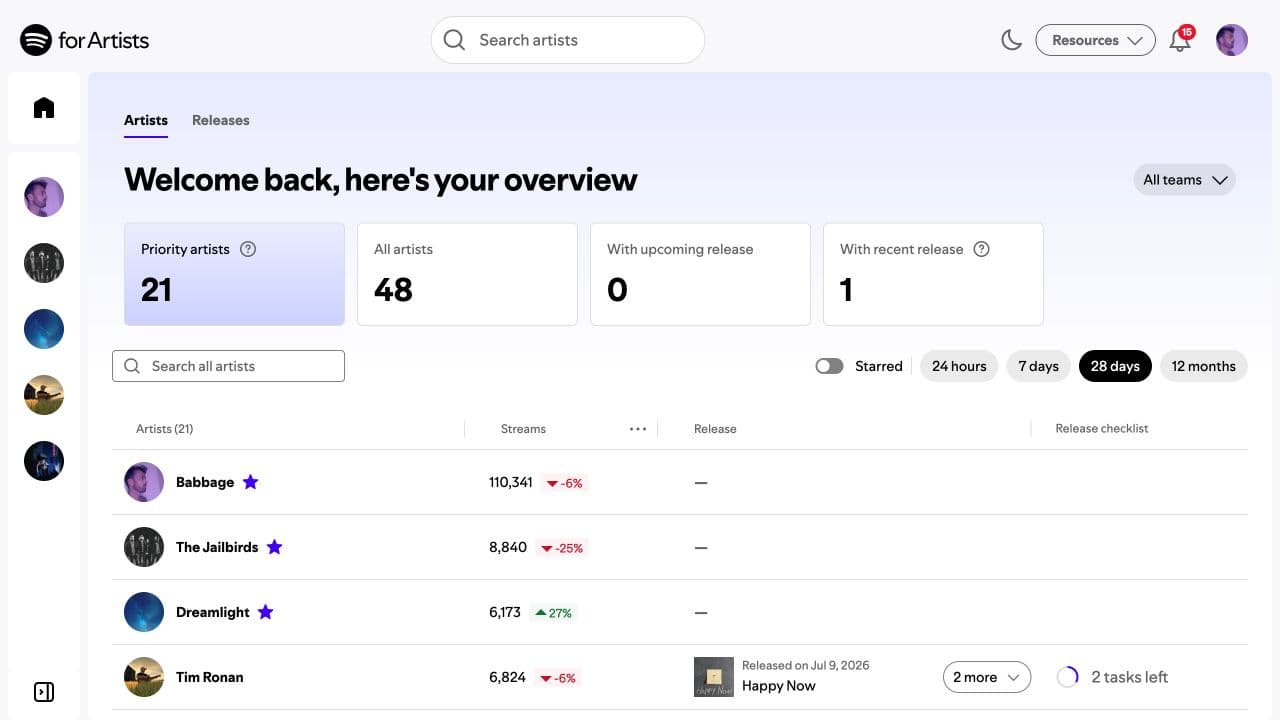
The key thing to understand before anything else: you can’t touch any of it until you have claimed and verified access. Spotify won’t let you edit a profile you haven’t verified you control. So the first step is getting in.
Step one: claim your profile
Claiming access is covered fully in the claim your Spotify for Artists profile guide, but here’s the map. You request access at the S4A site or app after your music is live. The usual path is through your distributor: many distributors handle the verification step on your behalf and you find yourself with access faster than you expected. If someone else already has an Admin or Owner role on your account, they can grant you a role directly without going through the distributor.
S4A has a tiered role system: Owner, Admin, Editor, and Viewer. What you can do depends on what role you have. Editors can update the profile and upload Canvas. Admins and Owners can do all of that plus manage team access and run Countdown Pages (if you clear the eligibility gate). If someone on your team needs access without full control, you give them Viewer or Editor, not Admin.
Can't edit anything yet?
If you see your profile but can’t change it, you likely have Viewer access or your access request is still pending. Check with your distributor or ask whoever set up the account to upgrade your role.
Canvas: the looping visual on the now-playing screen
A Canvas is the short looping clip that plays behind a track’s now-playing screen on mobile. You set one per track, and it only shows when the song is playing. It is a short vertical 9:16 loop with no audio, and the exact specs are covered in the Canvas guide.
Spotify reports that tracks with a Canvas see higher saves, shares, and listener adds than those without. Worth framing that accurately: that’s Spotify’s own data from their own reporting, not an independent study. The mechanism makes sense (a visual holds attention; a held listener is more likely to save), but I wouldn’t call it guaranteed. What I will say is the spec is tight enough that a bad Canvas is worse than no Canvas.
The full walkthrough, specs table, and the creative choices that make Canvas worth setting are in the Spotify Canvas size, length, and specs guide.
Artist Pick and the profile modules
Artist Pick is the pinned item at the top of your Spotify profile. You choose one thing: a song, an album, a playlist, or a Marquee campaign. You can add a custom image and a short text note alongside it. It’s the first thing a listener sees when they visit your page, so you want it to be whatever you’re pushing right now. Most artists forget to update it between releases. Don’t be that artist.
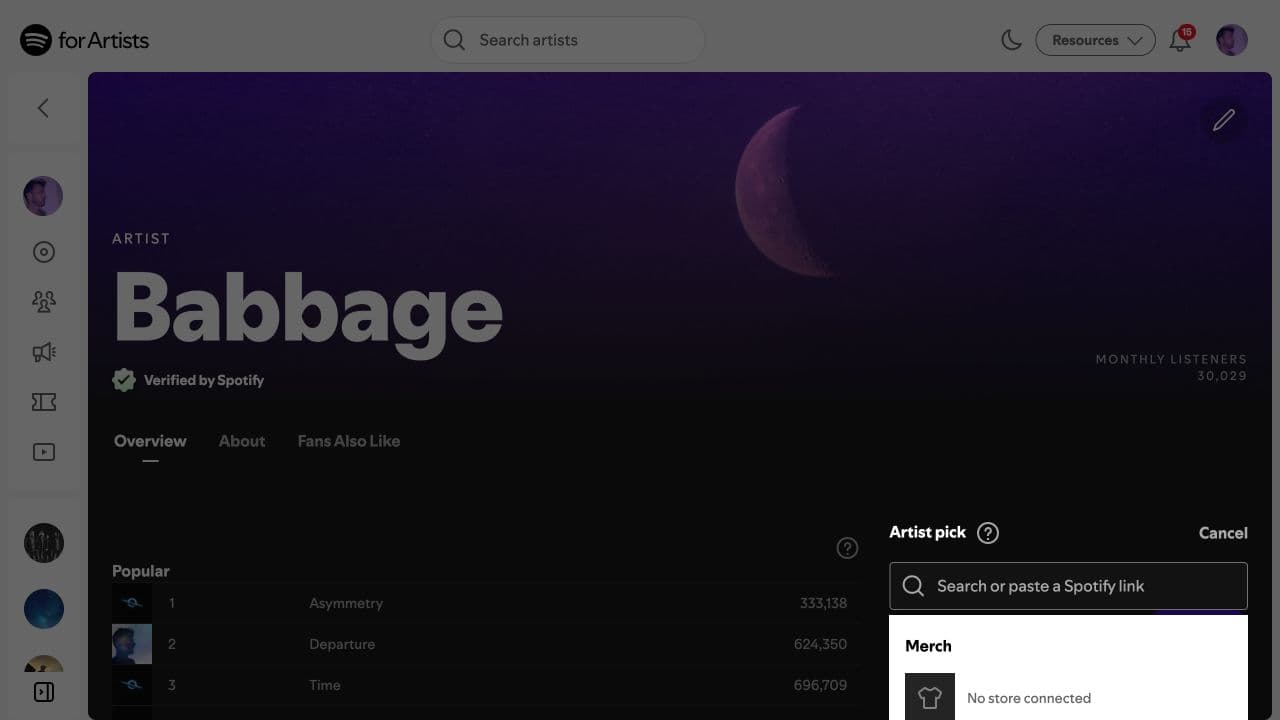
Beyond the Pick, your profile has a bio (plain text, a few hundred characters), a profile image and header, and an image gallery. The Concerts module pulls tour dates from ticketing partners if you’ve got that connected. The Merch module integrates with partners like Shopify. Each of these needs to stay current for the profile so the music does the selling.
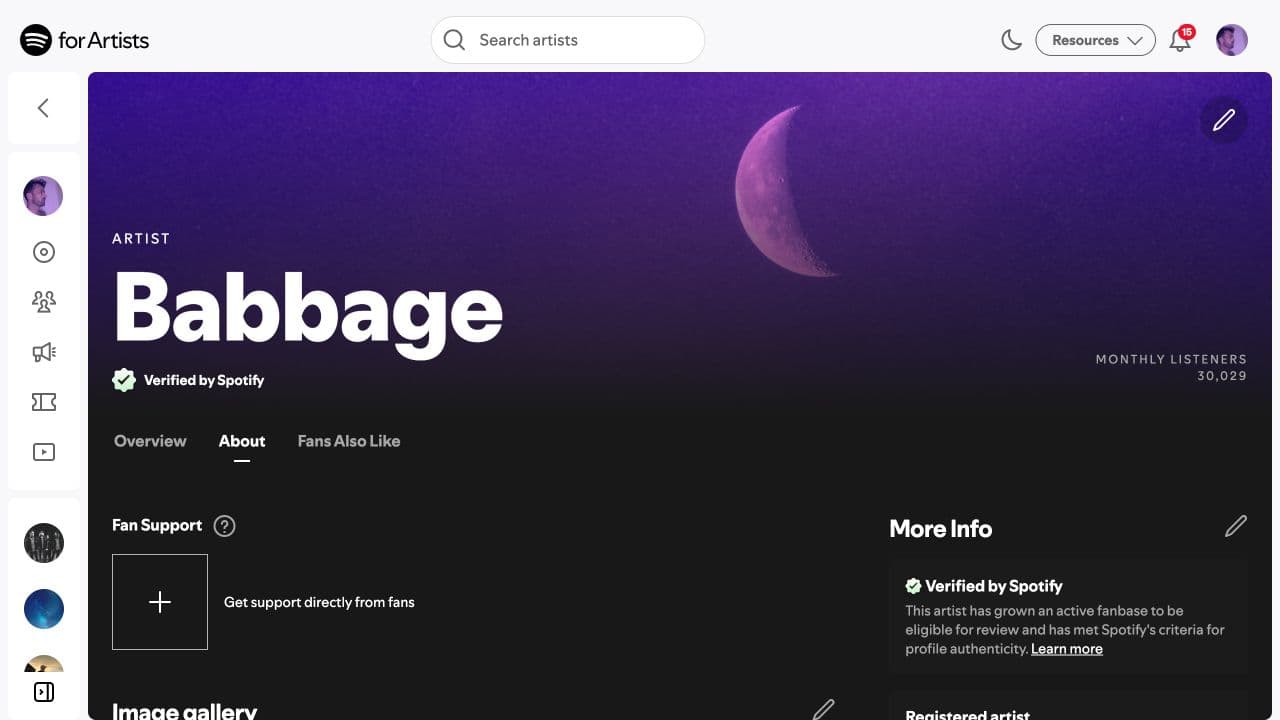
The full breakdown of each module is in the Artist Pick and profile customization guide.
Countdown Pages and pre-saves
Spotify has a native pre-save tool called Countdown Pages. It creates a dedicated page with a live countdown where fans can pre-save your upcoming release. There’s a catch: an eligibility gate. You need a monthly-listener minimum (Spotify has updated this threshold before, so verify the current number in S4A) plus Admin or Editor access. Historically it has been oriented around albums and EPs rather than singles. Most early-stage artists don’t clear it.
If you don’t, you have two practical options. A third-party pre-save tool handles the authorization through Spotify’s login and works for any artist. Or you use a smart link: one URL that sends fans to your release across every platform, not just Spotify. If you want to send fans somewhere before release day without worrying about eligibility gates, vlvtn.link is a Velveteen smart link that routes listeners to your release on every platform with one URL and works for any artist at any size.
All the detail on Countdown Pages, the gate, and how to run the pre-save either way is in the Countdown Pages and pre-saves guide.
Pitching and algorithm: covered elsewhere
Two big topics live in S4A but are covered in their own guide series. Editorial pitching, the field in S4A where you submit an unreleased track to Spotify’s editors before release, has its own complete guide at Spotify editorial pitching, including timing, what editors look at, and what to write in the pitch field.
How Spotify’s recommendation system works, Release Radar, Discover Weekly, and what signals feed the algorithm, is at the Spotify algorithm guide. Both of those are worth reading once you’ve got the basics of your profile sorted.
The profile is the foundation. Pitch and algorithm work build on top of it. Get the dashboard claimed and the profile current before anything else.
Marquee and Showcase: the paid side of S4A
Marquee and Showcase are in-app sponsored recommendation tools: you pay Spotify to surface your music to listeners who have already shown interest in your catalog. They’re available in the US and a handful of other markets. Both require eligibility: a recent or upcoming release, and a monthly-listener threshold. They’re also not cheap for early-stage budgets.
These are not free profile features. They’re a paid product, and Spotify says explicitly that they don’t guarantee a result. If you’re at the stage where you’re considering them, the S4A dashboard will show you whether you currently qualify and the current minimum spend.
Frequently asked questions
Is Spotify for Artists free?+
Yes. The core dashboard, profile editing, Canvas uploads, Artist Pick, stats, and the editorial pitch tool are all free. Marquee and Showcase are paid in-app promotion tools available in select markets, gated behind eligibility requirements. They're separate from the free features.
How do I get access to Spotify for Artists?+
You request access at the Spotify for Artists site or app after your music is live. The fastest route is through your distributor, many of whom handle the verification on your behalf. An existing team member with Admin or Owner access can also grant you a role directly. You can't edit your profile until access is confirmed.
What can I actually do in Spotify for Artists?+
You control your profile images and bio, set a looping Canvas on individual tracks, pin an Artist Pick to the top of your profile, read stream and audience stats, pitch unreleased songs to editorial, and manage the Concerts and Merch modules if you've connected the relevant partners. Paid promos like Marquee and Showcase live in the same dashboard but are a separate product.
What is a Canvas on Spotify?+
A Canvas is a short looping visual that plays on the now-playing screen of a track. Specs are 3 to 8 seconds, vertical 9:16, recommended 720x1280 pixels, MP4 or JPEG format, no audio. You set one per track inside Spotify for Artists. Spotify reports that tracks with a Canvas see higher saves and shares, though they frame that as their own observed data, not a guarantee.
Can I run a pre-save through Spotify for Artists?+
Only if you clear the eligibility gate. Spotify's native pre-save tool, called Countdown Pages, requires a monthly-listener minimum plus Admin or Editor access in Spotify for Artists. Most early-stage artists don't qualify, so the alternative is a third-party pre-save or a smart link that routes fans to your release across all platforms. The Countdown Pages guide in this guide series covers both options.

Get better release strategy in your inbox
Release planning checklists, royalty explainers, and artist strategy notes from Velveteen. No daily noise.
Was this useful? Send a signal or flag a correction.
Keep reading
Related guide
Claim your profile
Getting access to your artist profile: how the request and verification works, the role it usually routes through your distributor, and adding team members.
Related guide
Spotify Canvas
The looping Now Playing visual: exact specs, setup and troubleshooting, plus the current boundary between Canvas, retired Clips uploads, countdown videos, and full-length video.
Related guide
Spotify video uploads
How Spotify's beta video uploader works, what you can upload, the file specs, and why it belongs beside Canvas in your release plan.
Related guide
Profile protection
The approval gate for artists with profile mixups, common names, or impersonation risk, including when the added release friction is worth it.
Related guide
Artist Pick & profile
The profile modules you control: the Artist Pick you pin each release, the bio, images, Concerts, and Merch, and how to keep them current so the profile sells the music.
Related guide
Countdown Pages & pre-saves
Spotify's native pre-save: the Countdown Page eligibility gate, how to check pre-save counts, and the smart-link alternative that works for anyone.
Write a stronger pitch in 30 seconds
Drop in your release context and get a critique-first Spotify pitch draft, weak spots, and a copy-ready description inside the 500-character limit.