How to Add or Change Your Spotify Artist Pick

In Spotify for Artists, open View Profile and select the plus button under Artist Pick. Choose the music, playlist, concert, merch, or podcast you want to feature, add a note or image, and publish it. The Pick remains live for up to 180 days unless its concert passes or its merch sells out.
Lead visual
Platform growth is signal work
1
profile
2
release
3
saves
4
repeat listeners
Key takeaways
- Put Artist Pick expiry on your release calendar so the profile never loses its featured item by surprise.
- Admins and Editors can manage Artist Pick from View Profile in Spotify for Artists on the web.
- Prepare separate files for the avatar, header, gallery, and Artist Pick instead of relying on one crop.
- Concerts import from supported ticketing partners. Check the artist attribution when an event is missing.
- Merch connects through Shopify and still needs inventory, release tags, and product status maintained.
Why does your Spotify artist profile matter?
Every time someone hears your song in a playlist or Release Radar and taps your name, they land on your artist profile. That page is where the decision gets made: follow this artist or not. The music got them there; the profile either holds them or loses them.
Most independent artists spend real time on their cover art and basically no time on their Spotify profile. The bio is placeholder text or something they copied from their Instagram. The Artist Pick is pointing at a song from a year ago. The images are whatever got uploaded at setup. It’s not that artists don’t care; it’s that nobody told them these modules exist and they need tending.
This guide covers all of it. The profile tools all live in Spotify for Artists, the free dashboard you claim once your music is live.
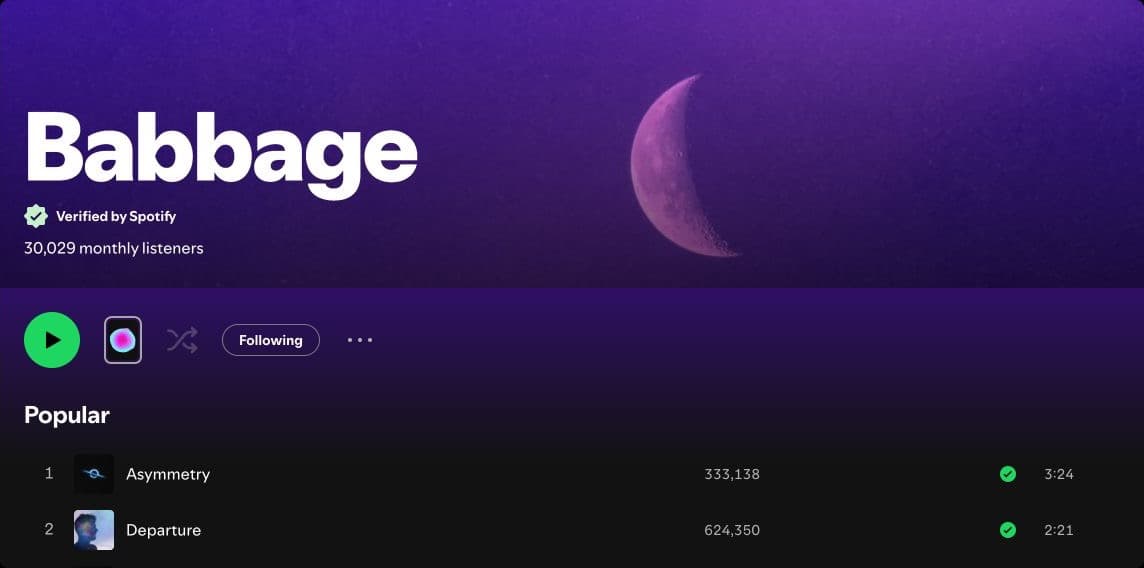
How do you add or change Spotify Artist Pick?
Artist Pick is a featured item near the top of your profile. In Spotify for Artists on the web, an Admin or Editor opens View Profile, selects the plus button under Artist Pick, chooses an eligible item, and publishes it. Current choices include songs, albums, music videos, playlists, concerts, merch, and podcasts. You can add a note and a custom image.
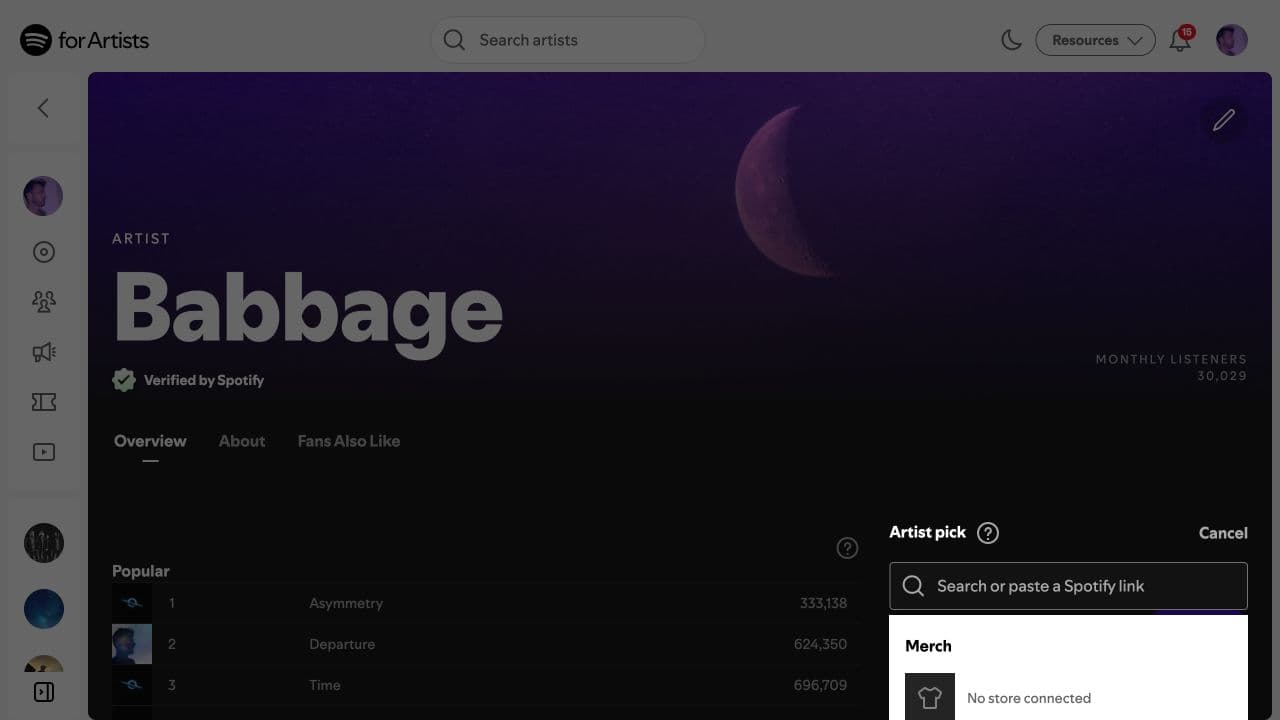
A Pick remains live for up to 180 days. A concert Pick ends after the show or when it sells out, and a merch Pick ends when the item sells out. Put the expiry on your release calendar. Whatever you’re pushing right now goes here. A new single drops? Update the Pick to point at the single. An album comes out? Update it again. If you haven’t touched the Artist Pick since your last release, it’s a problem. A profile with a year-old Artist Pick tells every visitor that nothing is happening. Even if you’re between releases, pointing it at a relevant playlist or your best-performing track is better than leaving something stale.
Treat the custom image like a visual call to action: use the single artwork, a session photo, or another compliant image that belongs to this release cycle.
Update the Artist Pick every time you release. That one habit keeps the profile looking like you still care about it.
How should you write a Spotify artist bio?
The bio allows up to 1,500 characters. It’s shown on the profile page, and on mobile it collapses so the first sentence or two carries almost all the weight. Most people won’t tap to expand. Write accordingly.
What doesn’t work: long third-person press releases with adjectives about the artist’s “unique sound” and “emotional depth.” Every bio says that. It means nothing to a listener who has never heard you.
What does work: something concrete in the first sentence. Where you’re from, what the genre is, who you’ve worked with if those names mean something to your audience, or something specific about the sound that a real person would use to describe it. If your music sounds like X crossed with Y, say that. If you’ve got a notable credit or placement, mention it. Listeners use the bio to decide whether this artist is worth a follow.
A practical bio framework
One sentence on who you are and what the music sounds like. One sentence on something real: a release, a collaboration, where you’re based, a show. Optional third sentence with a reason to follow now. Use @tags only when the Spotify link helps the reader.
What image sizes does Spotify for Artists require?
You have two image slots in Spotify for Artists: the profile photo (the circular image that shows next to your name everywhere on Spotify) and the header image (the wide banner across the top of your artist page on desktop and larger screens).
Use at least 750 by 750 pixels for the avatar and 2,660 by 1,140 for the header. Gallery images need at least 690 by 500 pixels. Spotify accepts JPEG, PNG, and GIF files up to 20 MB. Keep faces, logos, and important type away from the edges because Spotify crops these images differently across devices.
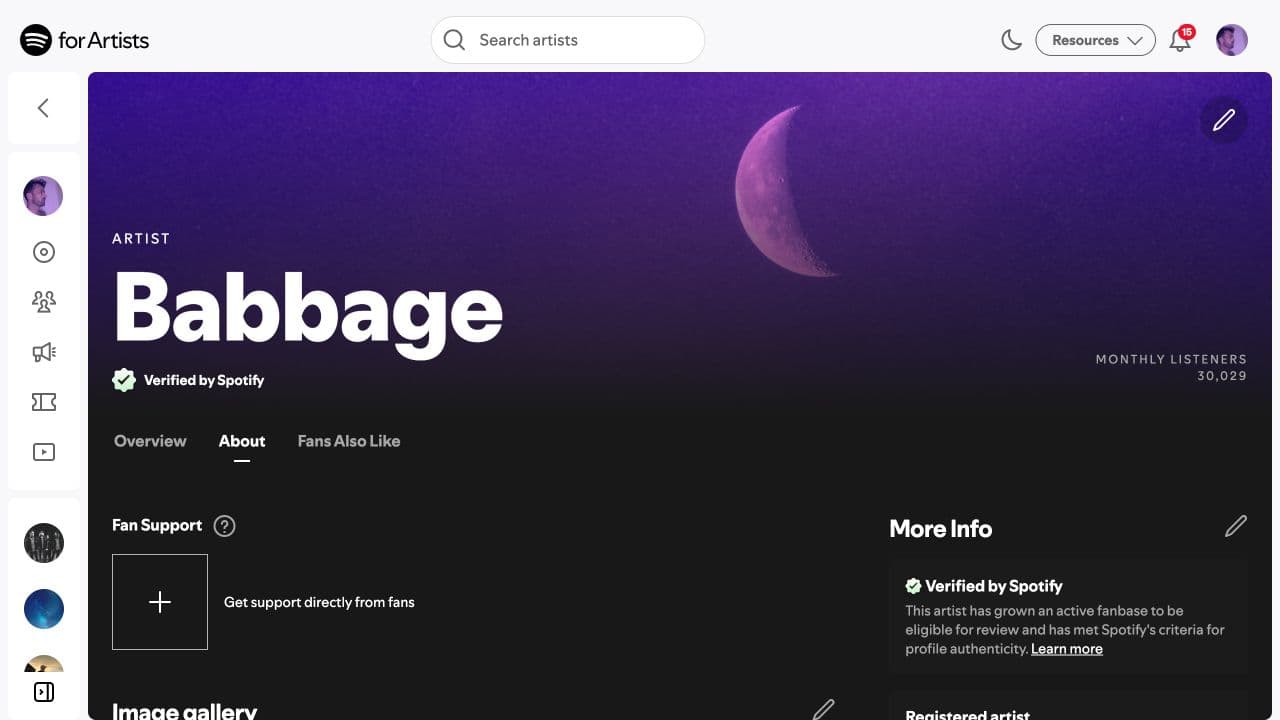
The gallery is a third image module: a collection of additional photos that sit below the main profile area. Think of it as a small visual portfolio. Promo shots, live photos, studio photos. You don’t have to fill it, but a gallery with a few good images signals an active artist more than an empty one.
How do concerts appear on a Spotify artist profile?
The Concerts module pulls your tour dates onto your Spotify profile automatically if your ticketing setup is integrated with Spotify. When a listener views your profile, they see upcoming shows near them if there are any.
The key word is automatically. You don’t manually add dates to Spotify. You make sure your dates are listed correctly on a supported ticketing platform, and that platform passes the data through. Spotify says new concerts usually show within 24 hours. Its current support page also says Songkick events are not displayed. If a date is missing, check the current partner list, the artist attribution on the event, and whether the 24-hour import window has passed.
For touring artists this is worth getting right. A listener who discovers you online and sees you’re playing their city is a potential ticket sale. The data flowing correctly is the whole product.
How do you add merch to a Spotify artist profile?
Spotify displays merch from Shopify on artist profiles, release pages, the Now Playing view, and the dedicated merch store. Connect one Shopify store to the artist, publish products to the Spotify sales channel, then tag each item to the releases it belongs with. Spotify currently allows up to 250 published items.
This is worth doing if you already run Shopify, but it still needs maintenance. Product status, inventory, release tags, and artist attribution determine what listeners can see. Treat Spotify as another storefront surface, not a replacement for your store or release campaign.
If you do not use Shopify, Spotify does not currently document another direct merch integration. Keep the external store in your broader campaign and revisit Spotify’s support page before changing commerce platforms for this feature alone.
How do you keep a Spotify artist profile current?
Every module here degrades passively. A bio written two years ago describes a version of the project that may not exist anymore. An Artist Pick from the last album tells a first-time visitor the newest thing you did was then. A header image from a previous era of the project undermines everything you’re doing visually now.
The fix isn’t complicated. Add a step to your release checklist: before any release goes live, open S4A and update the Artist Pick, check the bio, and confirm the images still match your current visual direction. For canvas, check the Spotify Canvas size and length specs for the dimensions and how to upload per track.
For everything that has to happen before a release drops, including the pitch window, the pre-save, and the profile updates, see the full Spotify for Artists guide.
once the profile is ready, draft your editorial pitch with the free Spotify pitch generator
Which Spotify sources define the current profile rules?
Frequently asked questions
What is the Spotify Artist Pick?+
Artist Pick is the featured slot near the top of your Spotify artist profile. An Admin or Editor can feature songs, albums, music videos, playlists, concerts, merch, or a podcast. Podcasts are selectable on the web. Music-video availability depends on the listener's country or region.
How long should my Spotify bio be?+
Spotify allows up to 1,500 characters in an artist bio. A few short paragraphs are enough for most artists. Lead with something concrete: who you are, where you're from, and what the music sounds like. You can also use @tags to link artists, albums, playlists, and tracks inside Spotify.
What size images does Spotify for Artists require?+
Spotify's current minimums are 750 by 750 pixels for an avatar, 2,660 by 1,140 for a header, and 690 by 500 for gallery images. Upload JPEG, PNG, or GIF files under 20 MB. An Artist Pick image should also be at least 690 by 500 pixels.
How do I add tour dates to my Spotify profile?+
List the event through one of Spotify's supported ticketing partners. Spotify imports eligible events automatically and says new concerts usually appear within 24 hours. Spotify's current documentation explicitly says it does not display events from Songkick, so use the partner list in Spotify for Artists rather than assuming any event feed will work.
Can I add merch to my Spotify profile?+
Yes. Connect a Shopify store to Spotify for Artists, publish products to the Spotify sales channel, and tag items to the relevant releases. Spotify currently supports one Shopify store per artist and lets you publish up to 250 merch items.

Get better release strategy in your inbox
Release planning checklists, royalty explainers, and artist strategy notes from Velveteen. No daily noise.
Was this useful? Send a signal or flag a correction.
Keep reading
Topic overview
Spotify for Artists guide
The free dashboard every artist should claim: how to get access, customize your profile and Canvas, set an Artist Pick, and run a native pre-save, with the eligibility gates called out.
Related guide
Spotify Canvas
The looping Now Playing visual: exact specs, setup and troubleshooting, plus the current boundary between Canvas, retired Clips uploads, countdown videos, and full-length video.
Related guide
Spotify video uploads
How Spotify's beta video uploader works, what you can upload, the file specs, and why it belongs beside Canvas in your release plan.
Related guide
Countdown Pages & pre-saves
Spotify's native pre-save: the Countdown Page eligibility gate, how to check pre-save counts, and the smart-link alternative that works for anyone.
Write a stronger pitch in 30 seconds
Drop in your release context and get a critique-first Spotify pitch draft, weak spots, and a copy-ready description inside the 500-character limit.